Payture eWallet
The Payture eWallet API provides additional capabilities for registering Customers and linking payment cards to registered Customer accounts. This lets you process recurring payments and payments with a saved card without the cardholder re-entering card details, including one-click payments.
Card data entry options
The eWallet API supports two implementation options, depending on where the payment card details are entered.
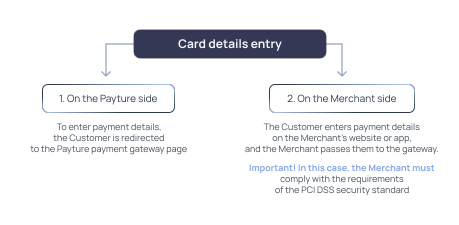
In the second option, the Merchant must comply with the PCI DSS security standard to guarantee an adequate level of protection for the entered data. To confirm compliance with this standard, the Merchant typically has to complete a Category D Self-Assessment Questionnaire (SAQ) and have it verified, which may involve additional, albeit small, financial and organizational costs.
If you are unable to pass PCI DSS verification, you cannot use the second option. In this case, we recommend the implementation in which card details are entered on the Payture payment gateway side.
Payment page on the Payture side
If you choose the implementation in which card details are entered on the Payture payment gateway page, you can use the standard Payture payment page or create your own template. Information and detailed technical guidance on creating templates are available here. You can either build your own template from scratch or modify the ready-made Payture templates.
The Merchant can either redirect the Customer directly to the Payture payment page or open it in an iframe on the store website or in a WebView in a mobile app.
Standard set of e-commerce operations in the eWallet API
| Customer management | Managing Customer accounts: registration, update, check, and deletion |
| Card management | Managing Customers' saved cards: adding, activating, and removing cards, and retrieving the card list |
| Init | Initializes a one-step payment, a two-step payment, or adding a card: creates the payment session required to open the payment page or the add-card page. For the "Payture side" implementation only |
| Pay — Payture side | Opens the payment page for entering card details on the Payture payment gateway side |
| Pay — Merchant side | One-step charge or a hold of funds as part of a two-step payment, with card details entered on the Merchant side |
| Pay — recurring payments | Payment with a previously saved card without re-entering card details (a recurring or one-click payment) |
| Charge | Captures funds held on the Customer's card as part of a two-step payment |
| Unblock | Releases the hold of funds on the Customer's card |
| Refund | Full or partial refund to the Customer's card |
| GetState | Retrieves the current status of a payment |