Add
https://{Environment}.payture.com/vwapi/AddThe command registers a new card in the Payture system.
Note that in some cases (when the card-adding flow in use requires it), you need to not only add the card but also activate it. Payments with a registered card are possible only after activation. Typically, activation involves placing a hold on a small verification amount and then releasing it.
A card can be added not only with the Add command but also while making a payment.
Depending on whether the Merchant has a PCI DSS certificate, the card can be registered on the Merchant's web page or on a Payture payment gateway template.
On the Payture side
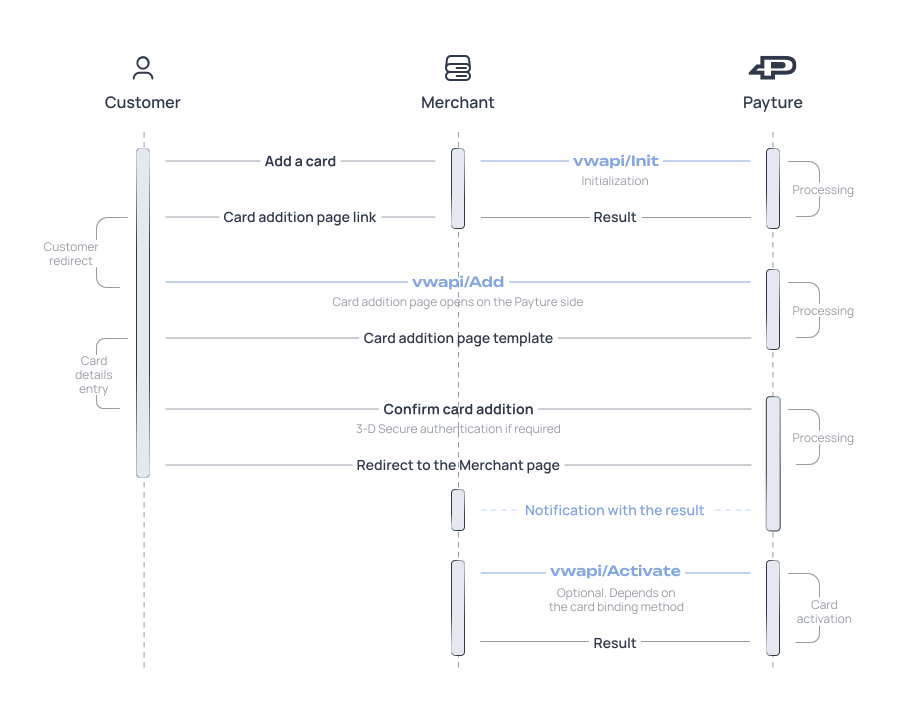
https://{Environment}.payture.com/vwapi/AddThe command opens the add-card page on the Payture payment gateway side. It is sent after a successful Init initialization command.
Interaction flow
Add request
curl https://sandbox3.payture.com/vwapi/Add \
-d SessionId=c8cc6c5c-30da-d7e1-e090-46f25ae30626 \Parameter names in requests are case-sensitive
The request can be sent using the GET or POST method.
| Parameter | Description | Format |
|---|---|---|
| SessionId | Session identifier returned in the response to the Init command By default, the session lifetime is 60 minutes. It can be changed via Payture support | String [36] Mandatory |
A successful operation opens the add-card page on the Payture payment gateway side.
The card-adding results are shown to the Customer, and after 3 seconds the Customer is redirected to the return page (the Url parameter of the Init request).
Important!
You may include the Success parameter in the Customer return URL (Url) to indicate whether the operation completed successfully (takes the values True/False). However, the Success parameter is vulnerable to manipulation by fraudsters and cannot serve as a guarantee of a successful operation. It may only be used to determine the further behavior of the frontend of the Merchant's system.
To get the actual transaction results, use the data received in the notification or in the transaction status request.
On the Merchant side
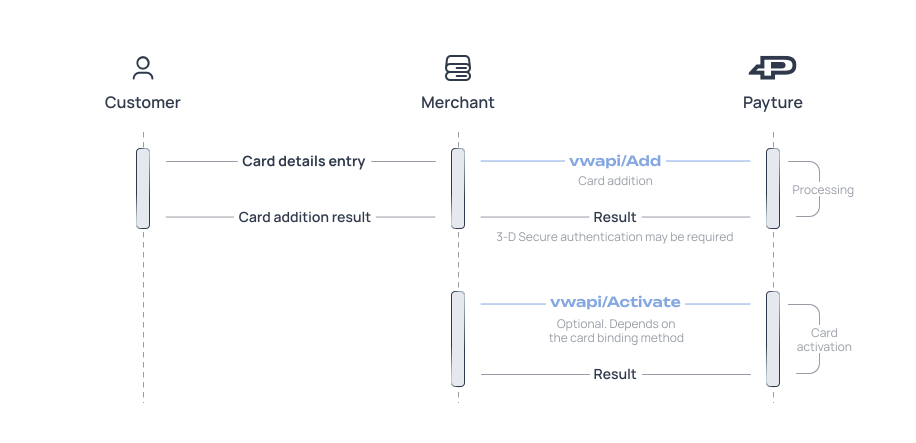
The command registers a new payment card directly on the Merchant's web page.
Important!
To use this card-adding option, the Merchant must comply with the PCI DSS security standard. If you do not have this certificate, we recommend using the Add command on the Payture side.
Interaction flow
Note that when 3-D Secure authentication is used, the order of the operation changes slightly, as described in the 3-D Secure section.
Add request
curl https://sandbox3.payture.com/vwapi/Add \
-X POST \
-H "Content-Type: application/x-www-form-urlencoded" \
-d VWID=VWMerchantside \
--data-urlencode "DATA= \
VWUserLgn=123@ya.ru; \
VWUserPsw=2645363; \
CardNumber=4111111111100031; \
EMonth=12; \
EYear=22; \
CardHolder=Ivan Ivanov; \
SecureCode=123; \
PhoneNumber=79156783333; \
AdditionalField1=Value1; \
AdditionalField2=Value2" \Parameter names in requests are case-sensitive
| Parameter | Description | Format |
|---|---|---|
| VWID | Payment terminal name Provided with the test/production access credentials | String Mandatory |
| DATA | Card parameters A URL-encoded string containing key-value pairs separated by “;” (semicolon). Keys and values are separated by “=” (equals sign) | String Mandatory |
DATA parameter keys
| Parameter | Description | Format |
|---|---|---|
| VWUserLgn | Customer identifier in the Payture system | String [1..50] Mandatory |
| VWUserPsw | Additional access parameter for the Customer's private information (Customer password) | String [1..50] Mandatory |
| CardNumber | Card number Digits without spaces | String [13..19] Mandatory |
| EMonth | Card expiration month 2 digits | Integer Mandatory |
| EYear | Card expiration year Last 2 digits of the year | Integer Mandatory |
| SecureCode | CVC2/CVV2 code 3 or 4 digits. Whether it is required depends on the card registration flow and the payment terminal configuration | Integer Optional |
| CardHolder | Cardholder's last and first name Latin letters and spaces only | String [1..30] Optional |
| PhoneNumber | Customer phone number Digits only, no separators. Format: [country code][operator code][subscriber number] | String Optional |
| Customer email Can be passed if it is not used as VWUserLgn | String [1..50] Optional | |
| Additional parameters | Any additional Merchant parameters There can be several additional parameters. Each parameter is passed separately | — Optional |
Example of the DATA parameter (decoded):
VWUserLgn=123@ya.ru;
VWUserPsw=2645363;
CardNumber=4111111111100031;
EMonth=12;
EYear=22;
CardHolder=Ivan Ivanov;
SecureCode=123;
PhoneNumber=79156783333;
AdditionalField1=Value1;
AdditionalField2=Value2
Response
An XML string with the Add element
Response examples
<Add VWUserLgn="123@ya.ru" Success="True" CardName="521885xxxxxx5484" CardId="00a94d92-1d84-44be-fa32-1c9591443347"/>| Parameter | Description | Format |
|---|---|---|
| Success | Operation success flag. Possible values:True — the operation succeededFalse — the operation failed3DS — 3‑D Secure authentication is required | String Mandatory |
| VWUserLgn | Customer identifier in the Payture system Matches the value passed in the request | String [1..50] Mandatory |
| CardName | Masked card number (first 6 and last 4 digits: 123456xxxxxx1234) Returned if “Success=True” or “Success=3DS” | String [13..19] Optional |
| CardId | Card identifier in the Payture system Returned if “Success=True” or “Success=3DS” | String [36] Optional |
| ACSUrl | 3-D Secure authentication server URL Returned if “Success=3DS” | String Optional |
| PaReq | 3-D Secure authentication request Returned if “Success=3DS” | String Optional |
| ThreeDSKey | Unique transaction identifier (MD) Returned if “Success=3DS” | String Optional |
| ThreeDSVersion | 3-D Secure protocol version: 1.0 — version 1 2.1 — version 2 Returned if “Success=3DS” | String Optional |
| AddInfo | Additional transaction parameters that can be returned in the payment gateway response by arrangement with Payture support A description of the format and available parameters is available here (in Russian) | Object Optional |
| ErrCode | Error code. See error codes Returned if “Success=False” | String Optional |
Cards
This section describes the eWallet functions for managing Customers' cards (linking a card to a Customer account, activating a card, removing a card, etc.)
AddSubmit3DS
The AddSubmit3DS command completes adding a card protected by 3-D Secure. It is sent after the Add request (merchant side) once the 3-D Secure authentication results have been received from the issuing bank.